
I wanted one thing from my Stream Deck +: proper control over Apple Music.
Not just a play button. I wanted the dial for volume and seeking, my playlists within reach, and keys that show what’s actually happening. And it had to work on macOS and on Windows.
The plugins I found felt lacking. The integration was thin and the controls I wanted weren’t there. I also wanted something that looked and felt like Apple.
So I built my own. It’s called Glass for Apple Music, and it’s coming soon to the Elgato Marketplace.
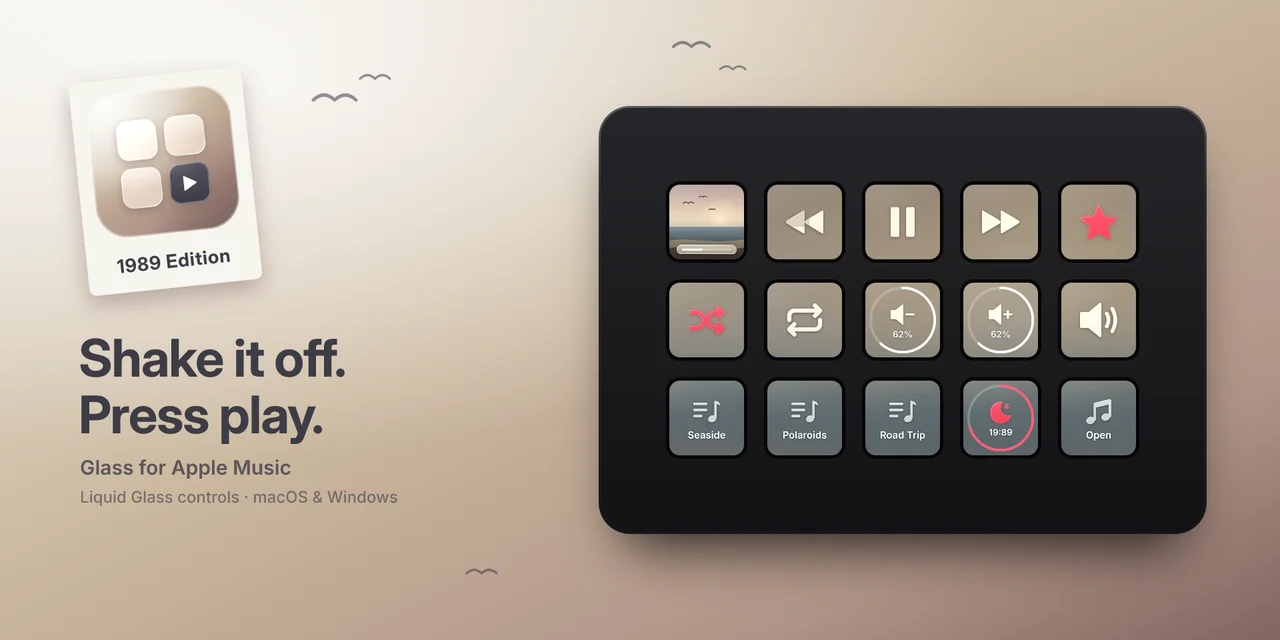
Making it look and feel like Apple
Apple’s Liquid Glass style is calm and layered, with controls that sit on top of the content instead of competing with it. I wanted the Stream Deck to feel the same way.
In Glass, every key is a piece of glass lying on the blurred artwork of the album you’re playing. The artwork isn’t repeated on each key. It’s spread across the whole deck, so a full Stream Deck reads as one continuous image.
Change the album and the deck changes with it. The controls stay in the same place, but their colours always match the music.
Built around the Stream Deck +
The Stream Deck + is what I wanted this for, and the dial does most of the work:
- Turn to change the volume or skip between tracks.
- Push to play or pause.
- Push and turn to seek within a song.
- Tap to switch modes.
- Hold to mute.
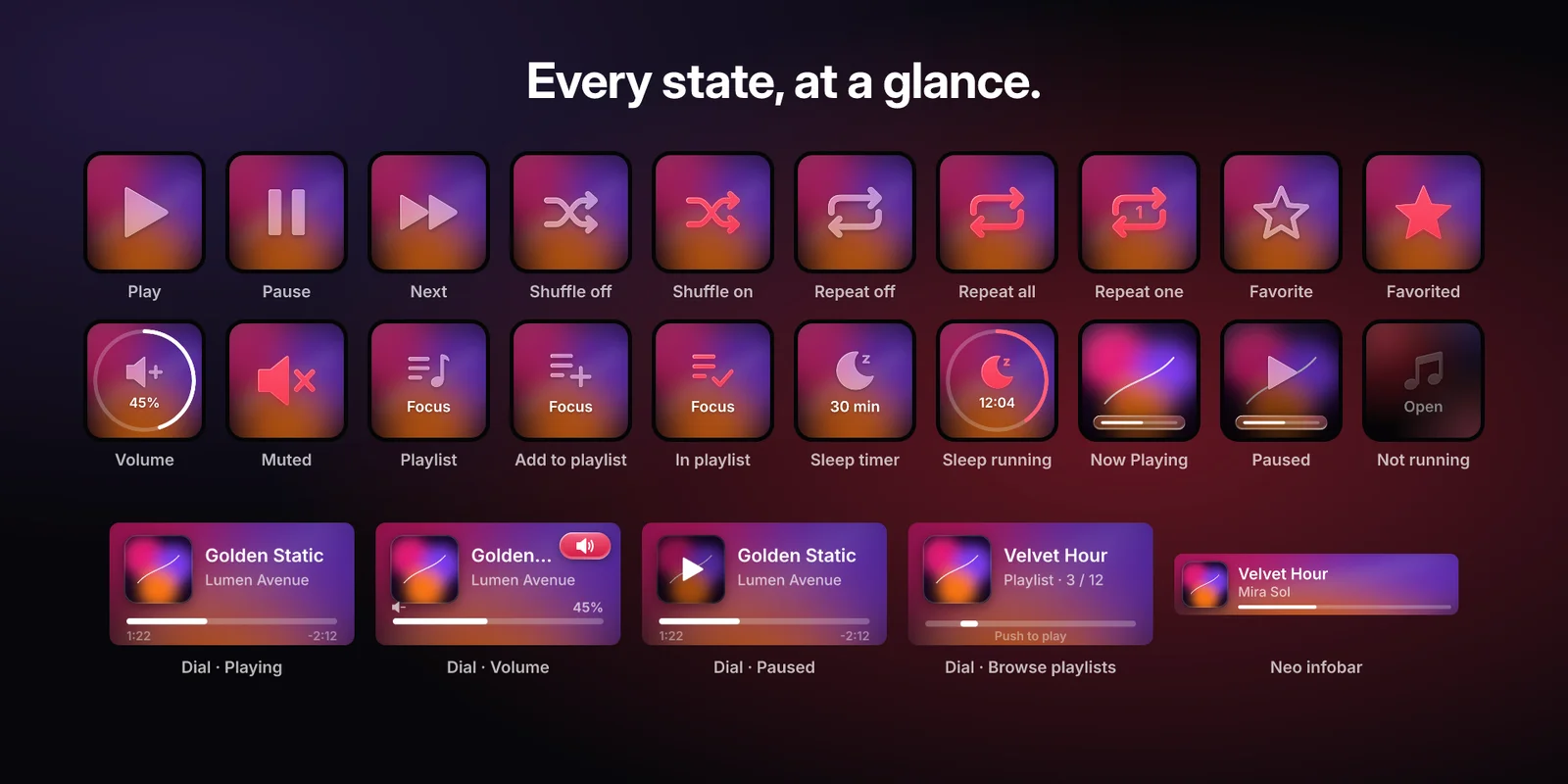
The touch strip shows Now Playing with album artwork and live progress. Another dial action lets you browse all your playlists.
It isn’t limited to the Stream Deck +. Glass also runs on the regular Stream Deck and the Stream Deck Neo, where Now Playing can sit on a key or the Neo infobar.
The controls I was missing
Beyond the dial, Glass covers what I expected a music plugin to do:
- Playback with the real state on every key: play/pause, next, previous, shuffle and repeat. If shuffle is on, the key shows it.
- Volume up, down, mute or jump to a level. Hold a key to keep adjusting. This changes Apple Music’s volume, not your system volume.
- Playlists: start one with a single key, or add the playing song to a playlist. That key lights up when the song is already in it.
- Favourite the song that’s playing.
- Sleep timer from five minutes to two hours. Extend, restart or stop it from the same key.
The plugin is available in eight languages: English, German, French, Spanish, Japanese, Korean, and Simplified and Traditional Chinese.
macOS and Windows
Supporting both platforms was a requirement from the start, but they don’t behave the same.
Apple Music for Windows offers far fewer ways for other apps to control it than the Mac version. Playback, Now Playing, volume, the sleep timer and the dial work on both. On Windows, however, favouriting songs and starting or browsing playlists are experimental. They depend on the app’s user interface and may break when Apple updates it. Adding a song to a playlist is currently macOS-only.
I’d rather say that up front than promise identical behaviour.
You’ll need:
- Stream Deck app 7.6 or later.
- macOS 14 or later with the Music app, or Windows 10/11 with Apple Music from the Microsoft Store.
- Any Stream Deck. Dial actions need a Stream Deck +; the infobar action needs a Stream Deck Neo.
On macOS, the first time you use it, macOS asks whether Stream Deck may control Music. Choose OK. You can change this later under System Settings > Privacy & Security > Automation.
No accounts, no analytics
Glass talks to Apple Music on your computer. It has no accounts and collects no data.
There’s one exception worth knowing about: when a song has no artwork available locally, Glass looks it up through Apple’s public iTunes Search API. It sends the artist and the album or song title, and nothing else.
Getting Glass and sharing feedback
The source code is private. The Elgato Marketplace will be the only official place to get the plugin once it’s released.
The Glass repository on GitHub has screenshots and news. It’s also where you can report a bug or request a feature through the issue tracker. For bugs, include your operating system, Stream Deck model and app versions, and leave personal information out of logs and screenshots.
Glass for Apple Music is an independent project, not affiliated with or endorsed by Apple or Elgato.